Darren Zhang

Rowwise

A row counter for knitting and crochet that tells you what the next row needs.

Cosy scarf
0
rows done
Cable
0 of 6
Cross the cable in 5 rows
Tassels
0
Seed stitch
0 of 4
Repeat 1
Border
0 of 8
Repeat 1

Coming soon to the App Store.

Free for two active projects. Unlimited with one purchase.

Try counting here. Scroll to see counters and notes.

Questions

How you use it

  1. Name it and start counting

    Tap Add a row after each row. Tapped twice? Undo last row takes it back.

    New project › name it › start

    After one row
  2. Count without unlocking

    Put your count on the Lock Screen and add rows with +, without unlocking. The next row's note comes too.

    Count on Lock Screen, then lock your iPhone

    From the Lock Screen
  3. Give the tricky part its own counter

    Name a counter Cable. Keep Counts with my rows on, set Repeats every to 6, turn on Remind me at the end and enter “Cross the cable”.

    ••• › Extra counters › Add counter

    Your place in the repeat
  4. Notes arrive before the row

    Add a note to row 6. It appears when row 6 is next and stays until you add row 6.

    ••• › Row notes › Add note

    Before you start row 6
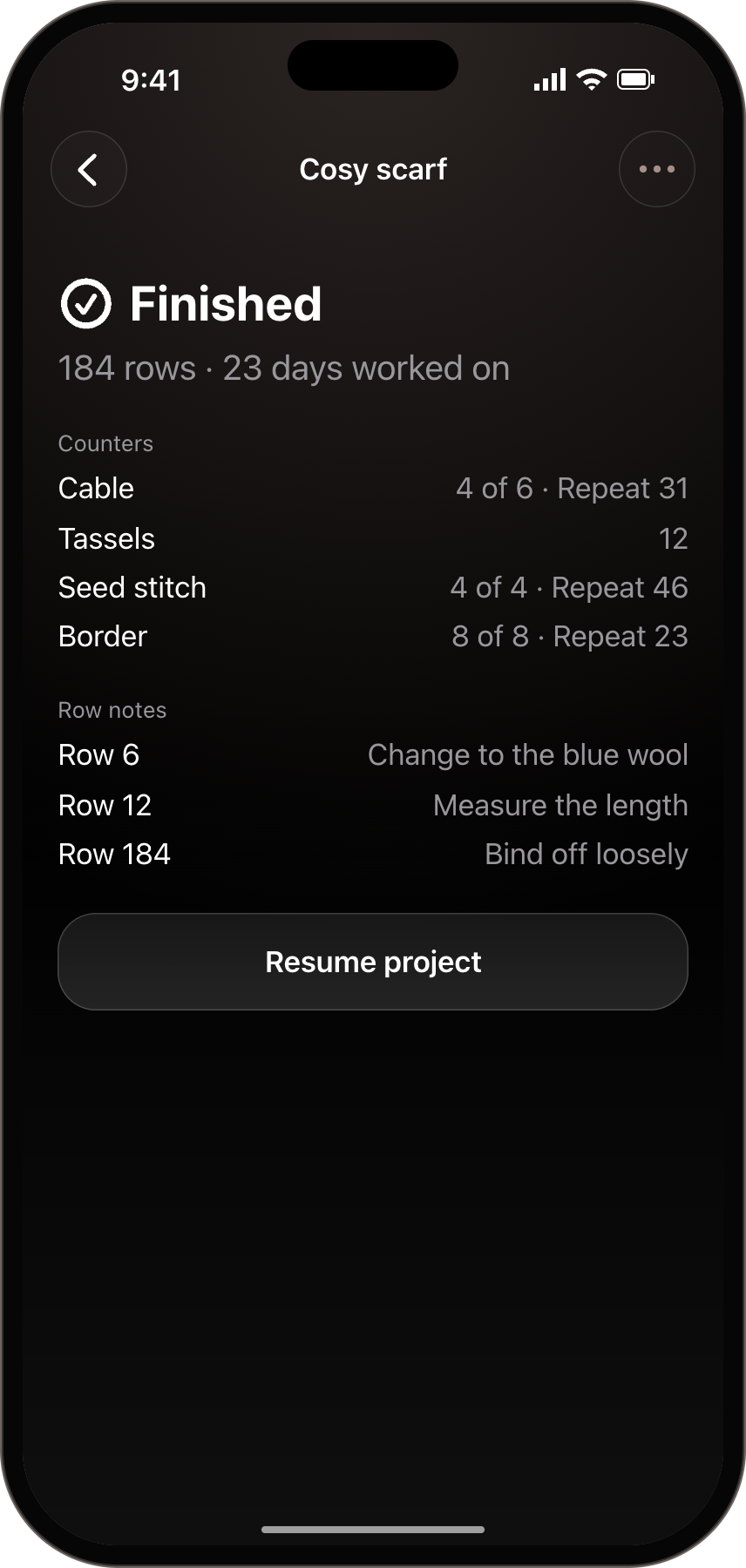
  5. Finish, with every count kept

    Mark it finished. Rowwise keeps rows, days, counters and notes. Finished projects don't use a free slot.

    ••• › Mark as finished. Open it later under Finished.

    After 23 days of work
Interactive preview

Also in Rowwise

Price
Free for two active projects. Unlimited projects: US$2.99 once, or the local App Store price.
Needs
iPhone with iOS 26 or later.
Widget and Siri
Add a row to your latest project from a Home Screen widget or a Control Center button. Say “Add a row in Rowwise”. The first time, Siri asks to use Rowwise’s shortcut. It counts the project you last worked on and tells you the row.
Set row
Frogged back or lost count? Set the row number and every repeat follows.
Feel each tap
In the app, every row you add or undo gives a soft buzz; adding a row gives a stronger one when the next row has a note or reminder. On by default; turn it off in Settings.
Large text and VoiceOver
Works at the largest text sizes, and reads out counts and reminders.

Questions

Is it a subscription?

No. Two active projects are free, and finished ones don’t count. One purchase unlocks unlimited projects for good.

How do I get unlimited projects on a new iPhone?

Open Settings in Rowwise and choose Restore purchases.

Will it work on my phone?

Rowwise needs an iPhone with iOS 26 or later.

Does it hold my pattern or sync with my iPad?

No. Rowwise keeps your place on your iPhone; read your pattern wherever you like.

What happens to my projects if I change phones?

They’re stored on your iPhone, so they move with your iPhone backup or when you transfer to a new iPhone. Deleting the app deletes them.

Can I count without looking?

In the app, every row you add or undo gives a soft buzz; adding a row gives a stronger one when the next row has a note or reminder. Turn on Click sound in Settings to hear it too, or ask Siri to add a row. Siri tells you the row number, not notes or reminders.

Why did my count leave the Lock Screen?

iOS takes Live Activities off the Lock Screen after several hours. Tap Count on Lock Screen again.

Does it work for crochet?

Yes. Rounds count the same way; the app calls them rows.

What else can it do?

You can add a target, project notes (yarn, needle or hook size), and a photo to a project. You can count stitches, sleeves or stripes separately with + and −; Turn on Left-handed layout in Settings to put those controls on the left. The counting screen stays awake while you count; you can turn this off in Settings. While your count is on the Lock Screen, it also shows in the Dynamic Island on iPhones that have one. Resume a finished project using a free slot, or unlock unlimited projects.

How do I get a refund?

You can ask Apple for a refund at reportaproblem.apple.com, and you can always email me if something is wrong.

I found a bug or have an idea

Email support@. I read every message.

Finished Cosy scarf record, with 184 rows and all counters kept.

Rowwise

Coming soon to the App Store. Free for two active projects. Unlimited with one purchase.